This paper details the integration between Kippy and Oracle HCM. The outcome showed how Kippy users can dynamically interface with the Oracle HCM APIs to sync users and key employee information.
Kippy integrates with other systems using “Kippy adapters”. They let end-users (Kippy KPI managers) specify which system, and which information within that system, should be used to populate the latest KPI values.
There are two types of adapters:
Provide connectivity to virtually any system.
Simplify integration with particular third-party products by abstracting their complexity.
Each third-party system typically has unique data structures and use cases, so product-specific adapters help end-users reach their goals without dealing with intricate integration details.
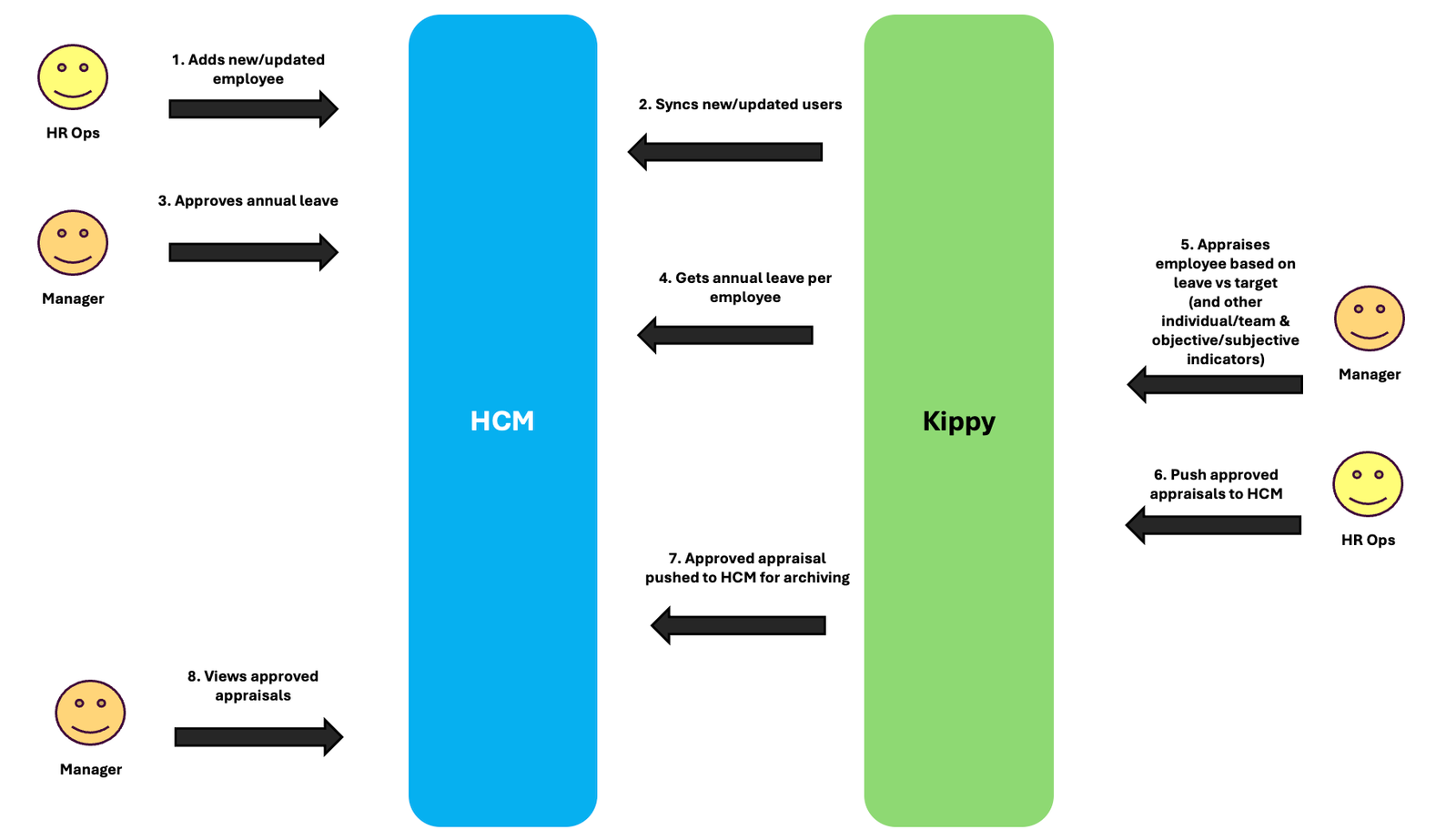
This integration shows how Kippy can integrate with Oracle HCM through these representative scenarios:
It also illustrates how similar integrations can be implemented for other use cases, making future integrations quicker and easier to deliver.
Oracle HCM stands for Oracle Human Capital Management. It is a cloud-based suite of applications that helps organisations manage their workforce throughout the entire employee lifecycle, from hiring to retirement.
Here is what it typically covers:
Because it is part of Oracle Cloud Applications, Oracle HCM integrates easily with other Oracle products (like ERP and Finance). It is widely used by medium to large enterprises to streamline HR processes, improve employee experiences and support global compliance.
HCM allows integration through several mechanisms:
Real-time integrations between modern cloud systems.
Bulk data transfer.
Legacy integrations.
This integration focuses on the REST API approach.
HCM provides APIs (Application Programming Interfaces) that let developers interact with and extend the functionality of the modules and components within the platform. These APIs enable integration with external systems, the development of custom applications and the automation of HR processes.
HCM offers a set of RESTful APIs to work with employee data, jobs, payroll, absences and more. These APIs support CRUD operations (Create, Read, Update, Delete) and querying data, and follow standard HTTP request protocols.
With the HCM APIs, developers can connect the platform to other systems, build custom applications on HR data, automate HR processes and gain insight from the platform. The result is streamlined HR operations, more accurate data and a seamless experience for HR professionals, managers and employees.
The HCM APIs follow commonly used protocols and standards to ensure interoperability and ease of integration:
Kippy provides many approaches to integrate with other systems (see Integrations & APIs for more details). One of those approaches uses adapters that connect to RESTful JSON APIs via OAuth 2.0 over HTTPS.
Kippy has many existing adapters that connect to external systems using those protocols and standards, with options for configurability, flexibility and hosting:
The good news is that integration with standards-based APIs is extremely easy.
The first step is to configure the HCM instance to allow connectivity, then save those connection details in your Kippy instance.
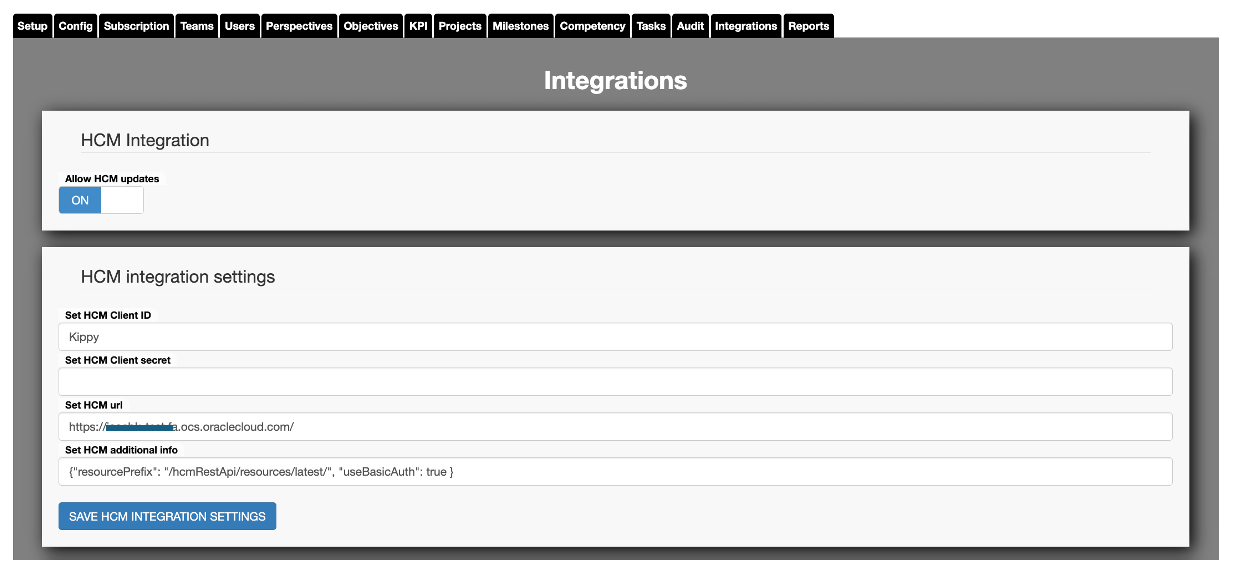
The Kippy add user HCM adapter runs on demand or on a nightly schedule. It gets personal information from the workers API and adds any new users with PerformanceEligible=YES to Kippy.
The PerformanceTeam must match an existing Kippy team, so that the Kippy user can be created in that team.
QUERY = "workers?expand=" +
    "citizenships," +
    "workRelationships.assignments.assignmentsDFF," +
    "workRelationships.assignments," +
    "emails," +
    "names," +
    "nationalIdentifiers," +
    "passports," +
    "phones," +
    "religions," +
    "workRelationships.assignments.gradeSteps," +
    "workRelationships.assignments.managers," +
    "workRelationships.contracts";

TRANSFORM = "items[].{"
    + "  DisplayName: names.items[0].DisplayName"
    + ", LocalDisplayName: names.items[0].LocalDisplayName"
    + ", Email: emails.items[0].EmailAddress"
    + ", PersonNumber: PersonNumber"
    + ", PersonId: PersonId"
    + ", PerformanceEligible: workRelationships.items[0].assignments.items[?PrimaryAssignmentFlag==`true`].assignmentsDFF.items[].performanceEligible | [0]"
    + ", PerformanceTeam: workRelationships.items[0].assignments.items[?PrimaryAssignmentFlag==`true`].assignmentsDFF.items[].performanceTeam | [0]"
+ "}";The Kippy update user HCM adapter runs on demand or on a nightly schedule. It updates the Kippy user’s additional info with information taken directly from HCM, including the annual leave balance and any termination date.
PerformanceEligible=NO, the Kippy user is set to unlicensed, so that user cannot log in to Kippy.QUERY = "workers?expand=" +
"citizenships," +
"workRelationships.assignments," +
"workRelationships.assignments.assignmentsDFF," +
"emails," +
"names," +
"nationalIdentifiers," +
"passports," +
"phones," +
"legislativeInfo," +
"workRelationships.assignments.gradeSteps," +
"workRelationships.assignments.managers," +
"workRelationships.contracts";
TRANSFORM = "items[].{" +
" DisplayName: names.items[0].DisplayName" +
", NameInformation1: names.items[0].NameInformation1" +
", LastName: names.items[0].LastName" +
", Gender: legislativeInfo.items[0].Gender" +
", Email: emails.items[0].EmailAddress" +
", PersonNumber: PersonNumber" +
", PersonId: PersonId" +
", Citizenship: citizenships.items[0].Citizenship" +
", DepartmentName: workRelationships.items[0].assignments.items[?PrimaryAssignmentFlag==`true`].DepartmentName | [0]" +
", GradeCode: workRelationships.items[0].assignments.items[?PrimaryAssignmentFlag==`true`].GradeCode | [0]" +
", JobId: workRelationships.items[0].assignments.items[?PrimaryAssignmentFlag==`true`].JobId | [0]" +
", PositionId: workRelationships.items[0].assignments.items[?PrimaryAssignmentFlag==`true`].PositionId | [0]" +
", StartDate: workRelationships.items[0].StartDate" +
", TerminationDate: workRelationships.items[0].TerminationDate" +
", ManagerAssignmentNumber: workRelationships.items[0].assignments.items[?PrimaryAssignmentFlag==`true`].managers.items[0].ManagerAssignmentNumber | [0]" +
", PerformanceEligible: workRelationships.items[0].assignments.items[?PrimaryAssignmentFlag==`true`].assignmentsDFF.items[0].performanceEligible | [0]" +
", AssignmentName: workRelationships.items[0].assignments.items[?PrimaryAssignmentFlag==`true`].AssignmentName | [0]" +
"}";The adapter then maps these fields into the user’s additional info, and looks up linked information such as the job, position, payroll, annual leave balance and absences taken this year:
info = add(info, "PersonId", personId);
info = add(info, "NameInformation1", nameInformation1);
info = add(info, "LastName", lastName);
info = add(info, "Gender", gender);
info = add(info, "AssignmentName", assignmentName);
info = add(info, "Citizenship", citizenship);
info = add(info, "DepartmentName", departmentName);
info = add(info, "GradeCode", gradeCode);
info = add(info, "JobId", jobId);
info = add(info, "PositionId", positionId);
info = add(info, "StartDate", startDate);
info = add(info, "TerminationDate", terminationDate);
info = add(info, "ManagerAssignmentNumber", managerAssignmentNumber);

info = addToAdditionalInfo(info, "JobName",
    getLinkedInfo("jobs/?q=JobId=", jobId, "Name", "items[].{ Name: Name }"));

info = addToAdditionalInfo(info, "PositionName",
    getLinkedInfo("positions/?q=PositionId=", positionId, "Name", "items[].{ Name: Name }"));

info = addToAdditionalInfo(info, "PayrollName", getLinkedInfo(
    "payrollRelationships?expand=payrollAssignments,payrollAssignments.assignedPayrolls&q=PersonNumber=",
    personNumber,
    "PayrollName",
    "items[].{ PayrollName: payrollAssignments[0].assignedPayrolls[0].PayrollName }"));

info = addToAdditionalInfo(info, "BalanceAsOfBalanceCalculationDate", getLinkedInfo(
    "planBalances?q=personId=",
    personId,
    "BalanceAsOfBalanceCalculationDate",
    "items[?planName=='Annual Leave'].{ BalanceAsOfBalanceCalculationDate: balanceAsOfBalanceCalculationDate}"));

info = addToAdditionalInfo(info, "AnnualAbsences", getLinkedInfo(
    "absences?q=personId=",
    personId,
    "AnnualAbsences",
"[{AnnualAbsences: sum(items[?duration!=null && starts_with(startDate, '" + DateTime.now().getYear() + "-')].duration)}]"));The annual leave balance, stored in the user’s additional info as the BalanceAsOfBalanceCalculationDate attribute, can be used in KPIs through the Kippy hcm.annualLeave data source adapter.
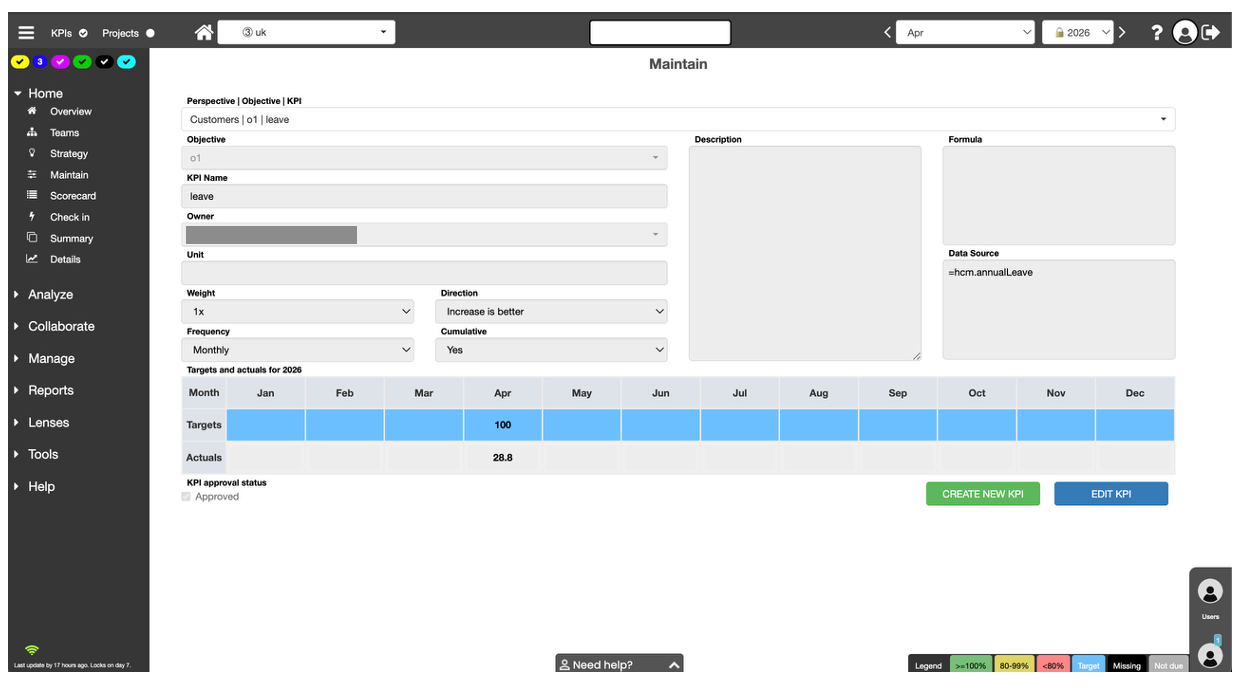
The adapter populates the current period’s actual with the average of all BalanceAsOfBalanceCalculationDate values for all users on that Kippy team.
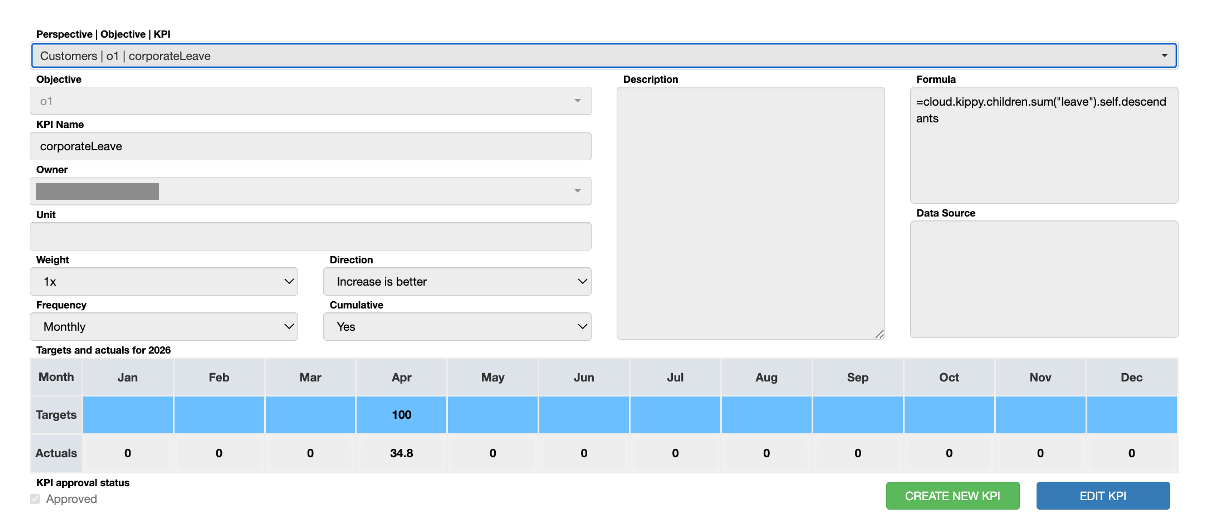
The children formulas can then find team- and department-level leave. For example, set the formula of a level 1 team KPI to =cloud.kippy.children.sum("leave").self.descendants
Managers conduct appraisals as usual, based on objective scoring of the KPIs that contain annual leave performance, mixed in with other KPIs and subjective competency appraisals.
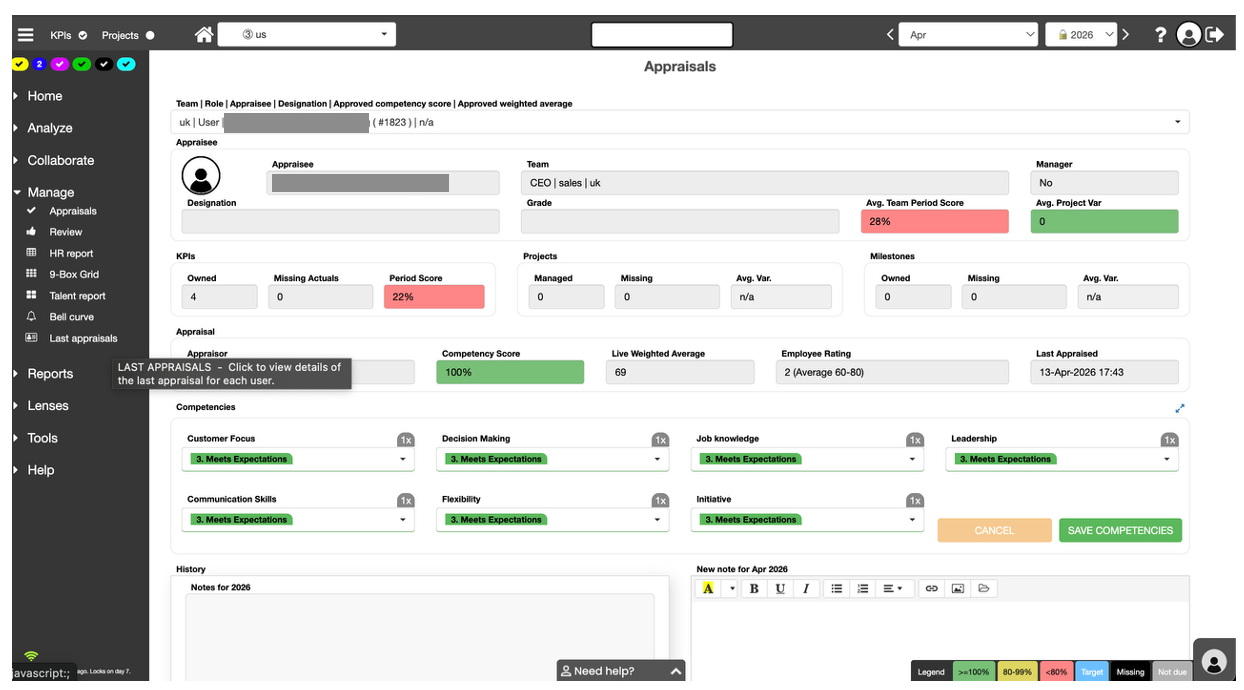
A manager with the hcm=true attribute in their additional info can open the Last appraisals report in Kippy and send appraisals to HCM, one at a time or in bulk.
personId.WORKERS_QUERY = "workers?q=PersonId=";
upsert(workerHref +
"/child/workersEFF/" +
personId +
"/child/PersonExtraInformationContextPerformance__ScoreprivateVO");
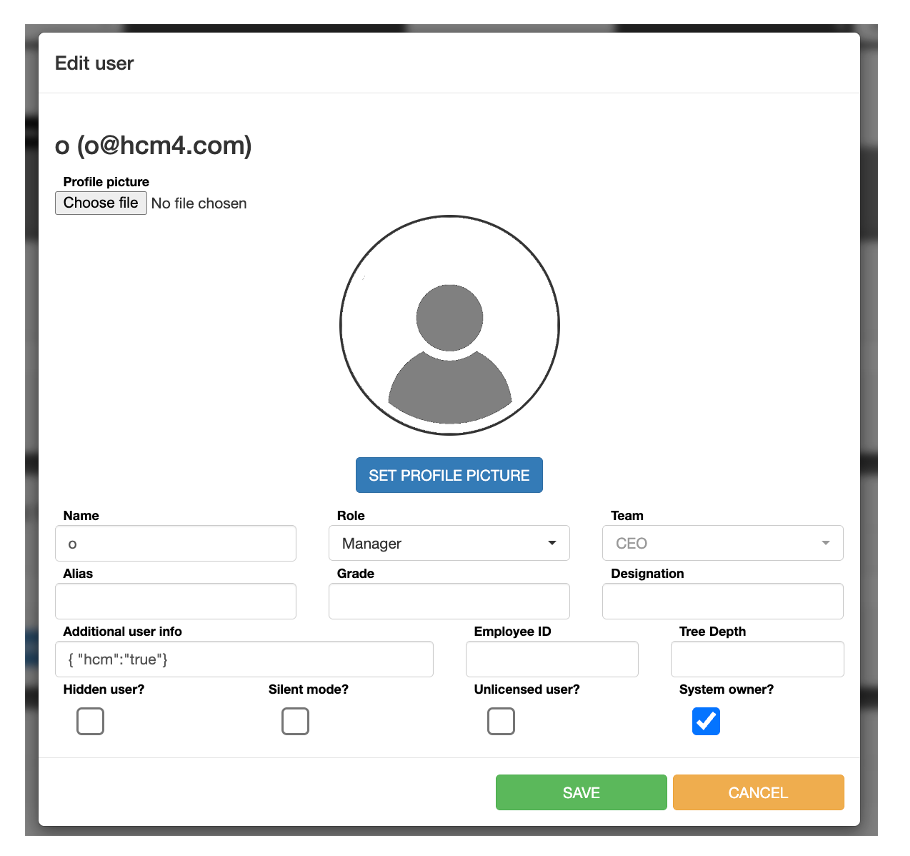
The audit log and the audit API can be used to monitor progress, changes and failures, for example:
/api/v4/query/?o@hcm4.com&organisation=hcm4.com&table=audit&filter.type=HCM&filter.year=2026&filter.month=4Adapters can also be run on demand.
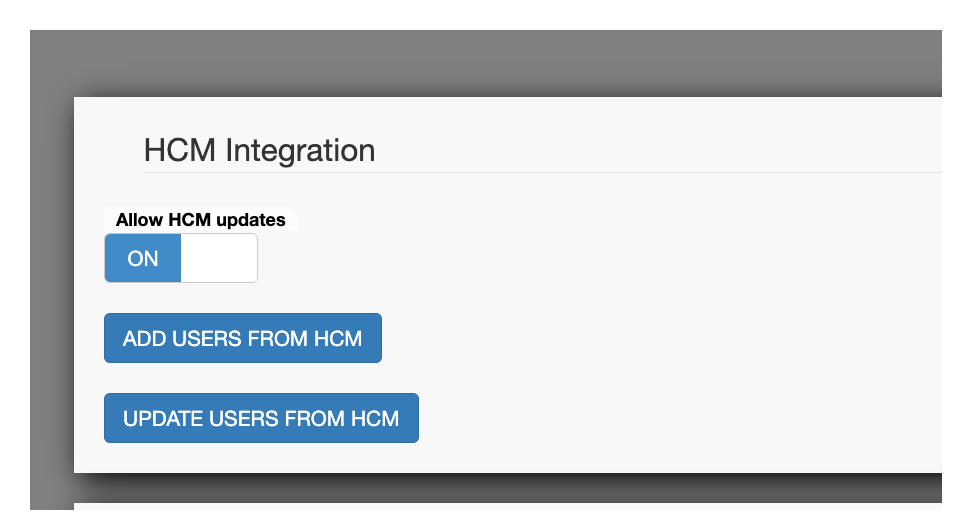
The department score shown in the HCM report is the KPI score of the team defined as the user’s “department”.
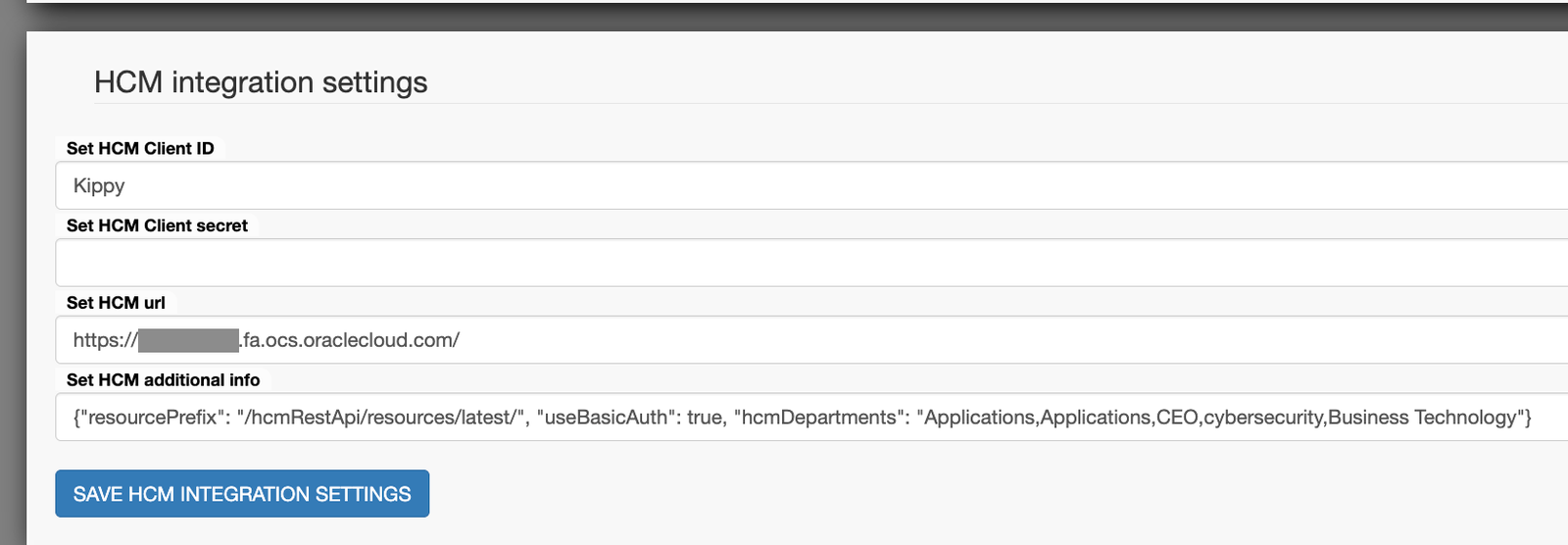
Departments are configured as a comma-delimited list of team names in hcmDepartments. The user’s department is either:
hcmDepartments, orhcmDepartments.If there is no match, it defaults to the level 1 team.
| Use | To get |
|---|---|
=hcm.annualLeave | The total annual leave of all staff in a team. |
=hcm.annualLeave.average | The average annual leave of all staff in a team. |
=cloud.kippy.children.average | Averages (rather than sums) across child teams. |
The nightly scheduler checks whether a schedule has been configured in the HCM additional info to run on that day.
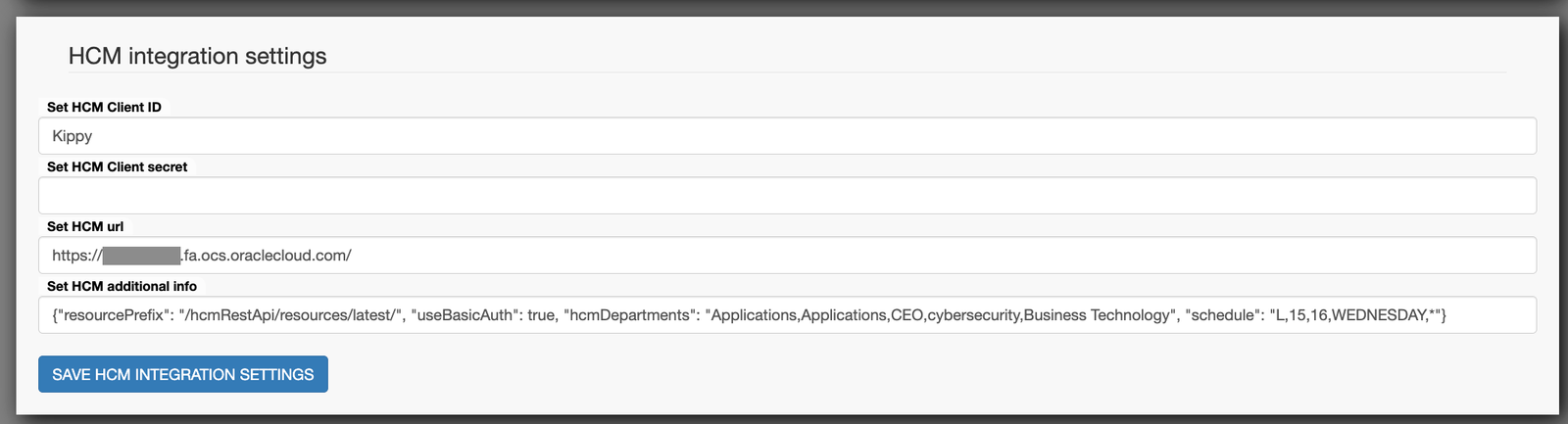
The schedule parameter takes these comma-delimited values:
| Value | Runs |
|---|---|
A day of the week, e.g. Monday | On that day every week. |
A number, e.g. 1 | On that day of the month (1 = the first of the month). |
L | On the last day of the month. |
* | Every day. |